
아키텍처
직접 작성하지 않은 코드를 탐색하세요.
저장소를 열면 Panolayer가 모듈, 함수, 클래스, 호출자, 의존성을 포함한 아키텍처를 매핑합니다. 지도는 모델이 생성하는 것이 아니라 소스에서 파싱하므로 같은 코드는 항상 같은 지도를 만듭니다. 당신도, 에이전트도, Panolayer Verification Engine도 모두 이 지도를 바탕으로 작업합니다.
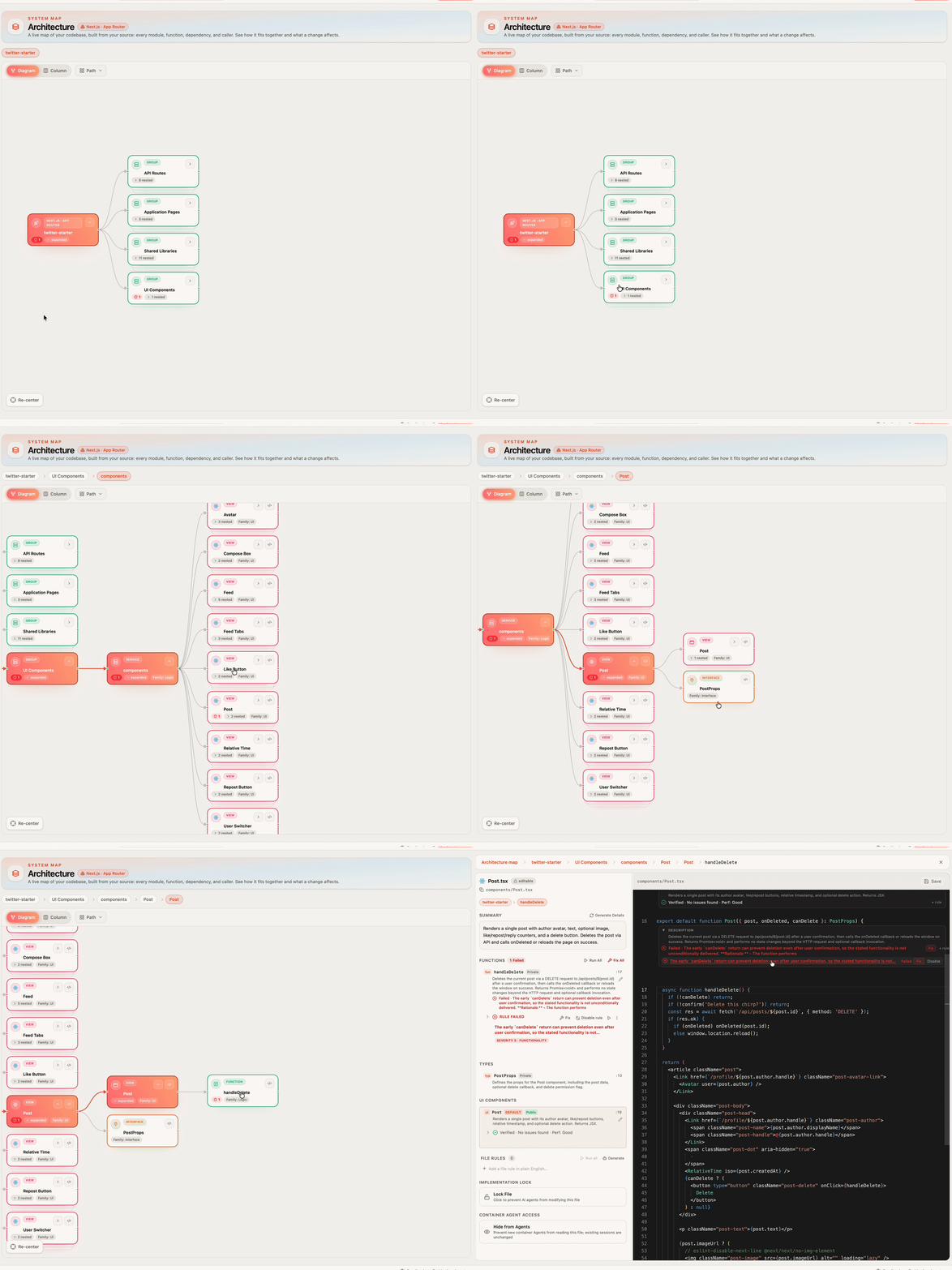
서비스 안으로 세 단계나 들어가서, 무엇이 이걸 호출하는지 알아내려 애쓰고 있습니다.
파일 트리는 코드가 어디에 있는지는 보여 주지만, 무엇이 그 코드에 의존하는지는 보여 주지 않습니다. 에이전트가 코드를 작성했고 가진 것이라곤 1,000줄짜리 diff뿐이라면 더 어려워집니다. Panolayer는 의존성을 매핑하므로 폴더가 아니라 무엇이 무엇을 호출하는지를 따라 시스템을 시각적으로 이동할 수 있습니다.
할 수 있는 일
01 / 아키텍처
시스템 전체에서 시작하세요
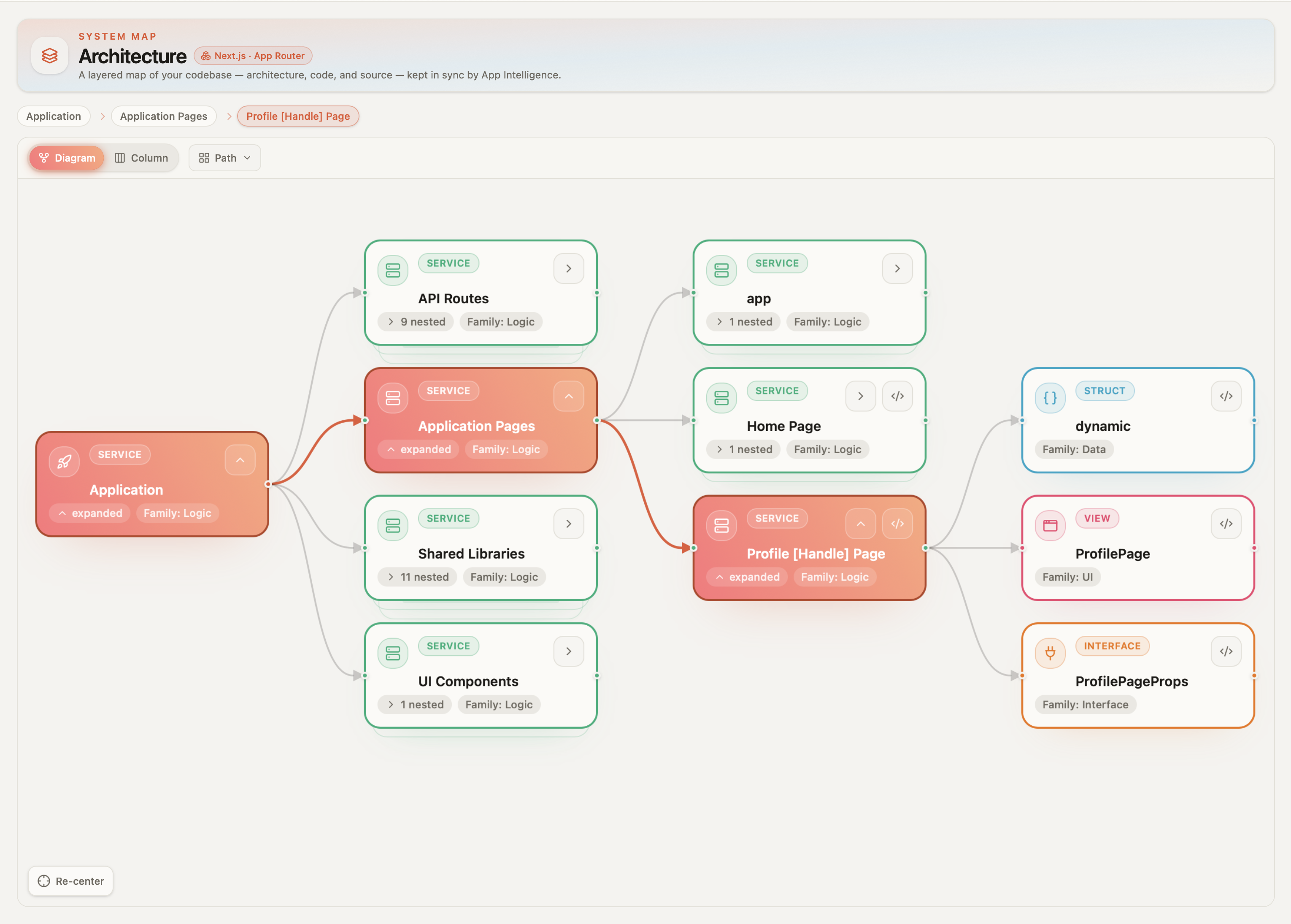
저장소를 열면 가장 먼저 시스템이 어떻게 맞물리는지 보입니다. 서비스, 각 서비스에 들어 있는 것, 그리고 서비스 간의 연결까지요. 보통은 그 코드를 오래 다뤄 본 사람에게서나 얻을 수 있는 그림입니다.
02 / 아키텍처
필요한 곳까지 파고드세요
서비스를 클릭하면 모듈이, 모듈을 클릭하면 함수가 보입니다. 다이어그램, 열, 경로 보기가 같은 구조를 세 가지 방식으로 보여 주므로, 보고 있는 코드에 가장 잘 맞는 보기로 전환할 수 있습니다.
03 / 아키텍처
어떤 함수든 컨텍스트 속에서 읽으세요
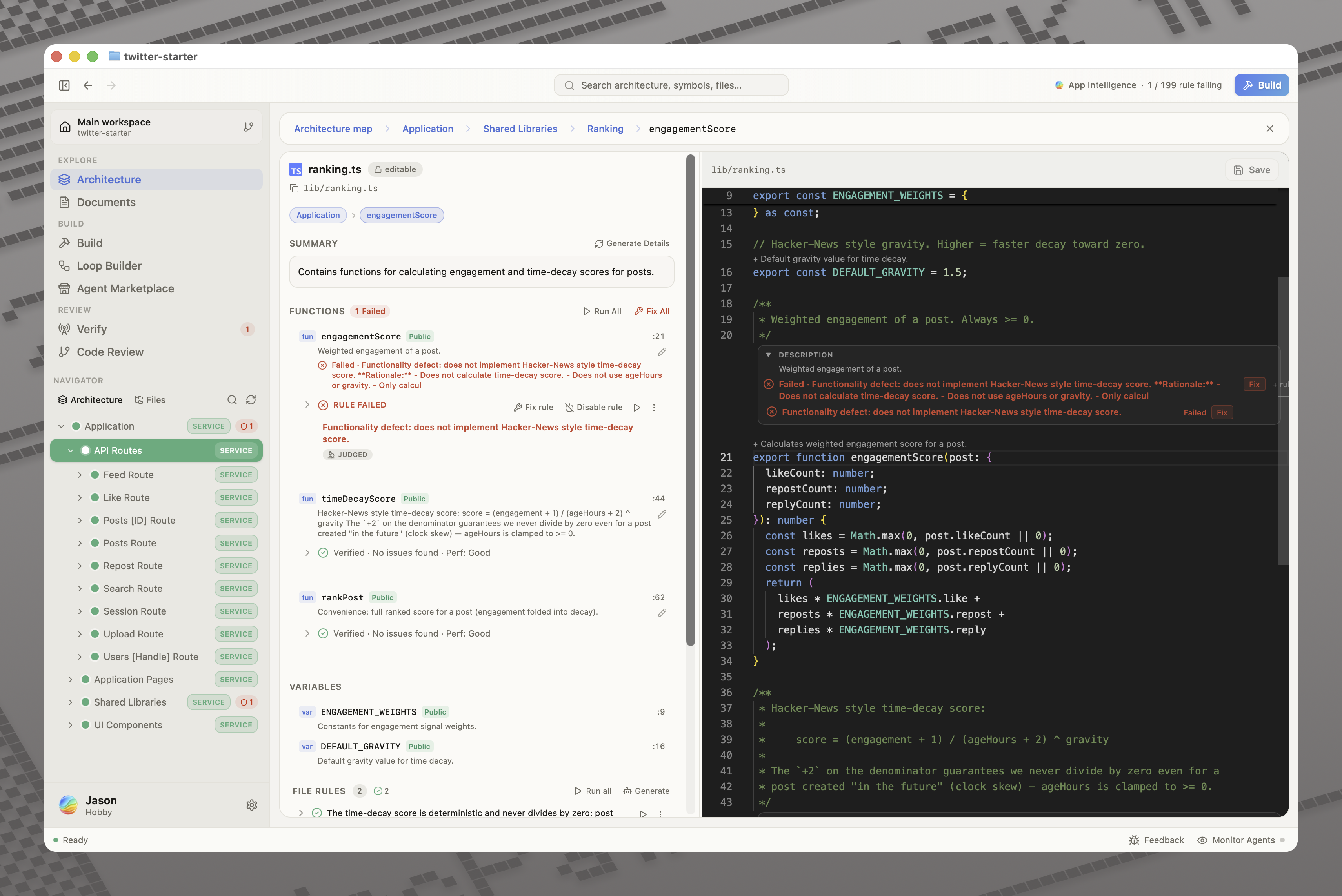
getPrice()를 열면 함수가 하는 일, 입력과 반환 값, 호출하는 곳, 의존하는 것, 적용되는 규칙, 현재 검증 통과 여부가 보입니다. 그렇지 않았다면 다섯 개의 파일과 검색으로 짜 맞춰야 했을 모든 정보입니다.
04 / 아키텍처
변경이 어디까지 닿을지 확인하세요
에이전트에게 getPrice()를 센트에서 달러로 바꾸라고 요청하기 전에, 무엇이 이 함수를 호출하는지 확인하세요. 상품 페이지, 장바구니, 결제 화면입니다. Panolayer는 어떤 함수에서든 의존성 그래프를 따라가므로, 누군가 변경하기 전에 그 변경이 무엇에 영향을 줄 수 있는지 알 수 있습니다.
05 / 아키텍처
에이전트도 같은 지도를 봅니다
실행하는 에이전트는 MCP 도구로 이 지도를 조회할 수 있으므로, 주어진 파일만 보고 작업하는 대신 함수를 변경하기 전에 무엇이 그 함수를 호출하는지 찾아볼 수 있습니다. 검증은 모든 변경을 같은 지도와 대조해 검사합니다. 즉, 당신과 에이전트와 검증이 모두 시스템에 대한 하나의 그림에서 출발합니다.
06 / 아키텍처
코드를 따라가는 문서
라이브 문서는 아키텍처에서 생성되고 코드가 바뀌어도 동기화된 상태를 유지하므로, 누군가 마지막으로 업데이트했을 때가 아니라 지금 모습 그대로의 시스템을 설명합니다.
Panolayer는 프로젝트를 기억합니다
새 에이전트 세션은 매번 백지에서 시작합니다. 같은 규칙, 같은 제약, 아무도 그 마이그레이션을 건드리지 않는 이유를 또다시 설명해야 합니다. Panolayer는 내린 결정, 규칙과 제약, 마이그레이션 이력, 과거 버그를 어떻게 고쳤는지 등 프로젝트에 대한 구조화된 기억을 세션을 넘어 유지합니다. Panolayer에서 코드베이스 작업을 오래 할수록 같은 말을 반복할 일이 줄어듭니다.
자주 묻는 질문
다이어그램은 LLM이 생성하나요?
아니요. 소스에서 파싱합니다. 요청하면 모델이 쉬운 말로 된 설명을 덧붙일 수는 있지만, 구조를 결정하지는 않습니다.
에이전트를 실행하지 않고도 아키텍처 지도를 사용할 수 있나요?
예. 저장소를 열고 직접 작성하지 않은 코드를 파악하는 데 사용하세요.
어떤 언어를 지원하나요?
TypeScript, JavaScript, Python, Go, Rust, Java 등을 지원합니다. 동적 호출과 생성된 코드는 추적하기 어려워 더 자세히 살펴봐야 할 수 있습니다.
지원 언어 보기모노레포에서도 작동하나요?
예.