
DEĞIŞIKLIKLER
Gerçekten önemli olan değişiklikleri okuyun.
Yapay zekâ artık geliştiricilerin inceleyebileceğinden daha hızlı kod yazıyor. Bir ajan size binlerce satırlık bir diff teslim eder ve hangi dosyaların regresyona yol açabileceği hakkında hiçbir fikriniz olmaz. Panolayer değişen her dosyayı riske göre puanlar ve nedenini açıklar; böylece önce hangilerini gözden geçireceğinizi bilirsiniz. Hazır olduğunuzda aynı yerden commit ve push yapın.
macOS için herkese açık beta. Ücretsiz başlayın, kredi kartı gerekmez.
3.000 satırlık bir diff’i kimse okumaz. Hepimiz sonuna kadar kaydırıp commit ederiz.
Büyük bir diff’in çoğu, ilginizi gerektirmeyen kilit dosyaları, yapılandırma ve küçük düzenlemelerden oluşur. Gerçekten bir şeyleri bozabilecek birkaç dosya ortalarda bir yerde gömülüdür. Panolayer onları öne çeker; böylece önce oraya bakar ve ajanın hızında ilerlemeye devam edersiniz.
01
Önce nereye bakacağınızı görün
Bir ajanın dokunduğu her dosyayı okuyacak zamanınız yok, buna ihtiyacınız da yok. Bir özet size kaç dosyanın değiştiğini, eklenen ve silinen satırları gösterir; değişen her dosya, tek satırlık bir gerekçeyle birlikte %0 ile %100 arasında bir risk puanı alır. Risk Spektrumu en yüksek riskli dosyaları kırmızı uca yerleştirir. Risk Çubukları ve Örtüşme aynı puanları dikey olarak ya da her değişikliğin neye dokunduğuna göre gruplanmış şekilde gösterir.
- Arayüz
- Mantık
- Veri
- API
- Yapılandırma
- Altyapı
- Bağımlılıklar
- Güvenlik
- Test
- Belgeler
- Stil
- Analitik
- Diğer
02
Dosyayı açın
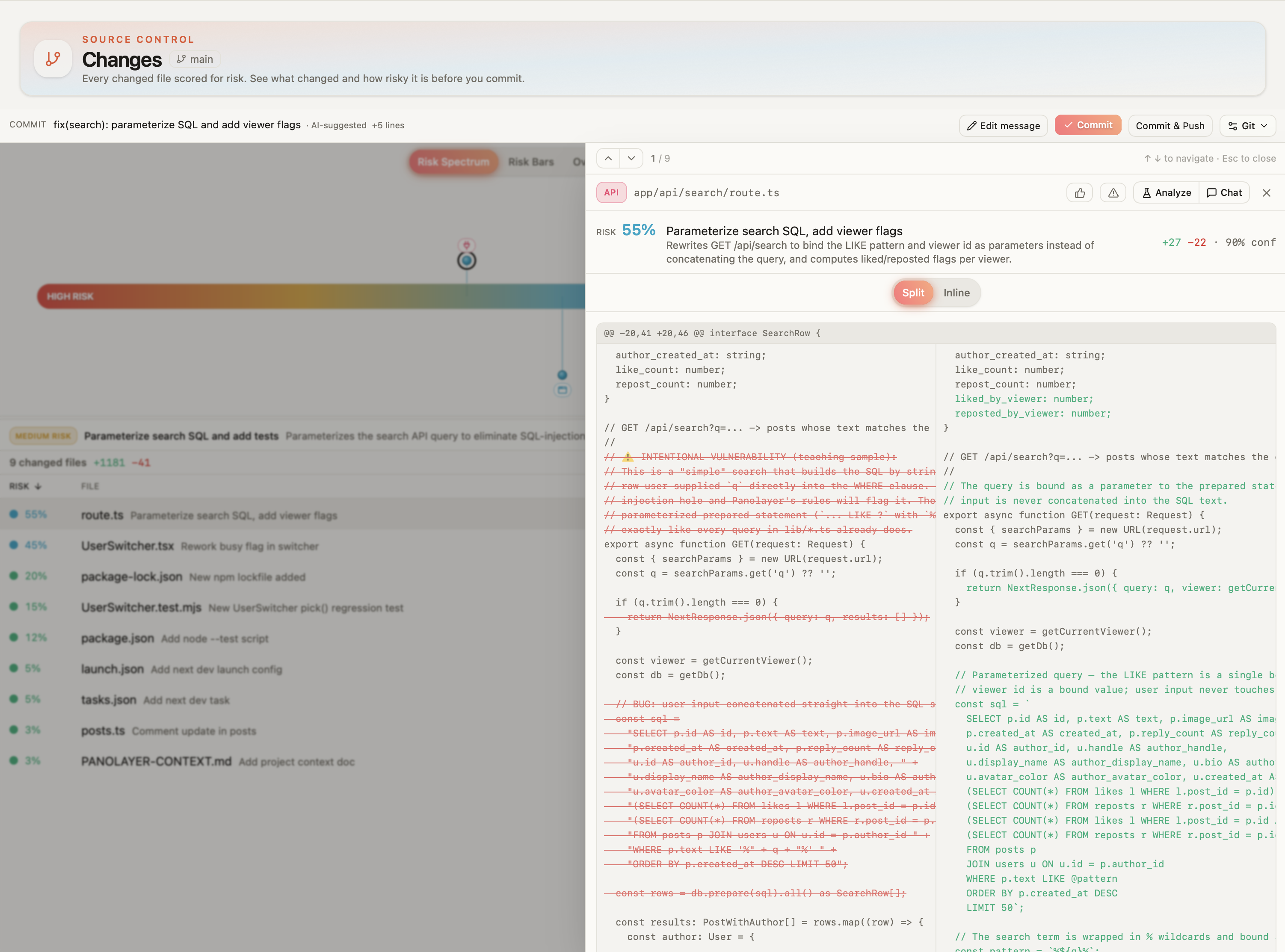
Bir dosya üst sıralarda yer aldığında, okumadan önce nedenini bilmek istersiniz. Diff için tıklayın; bölünmüş ya da satır içi görünümde, üstünde puanının tüm gerekçesiyle birlikte.
03
Puan yeterli olmadığında
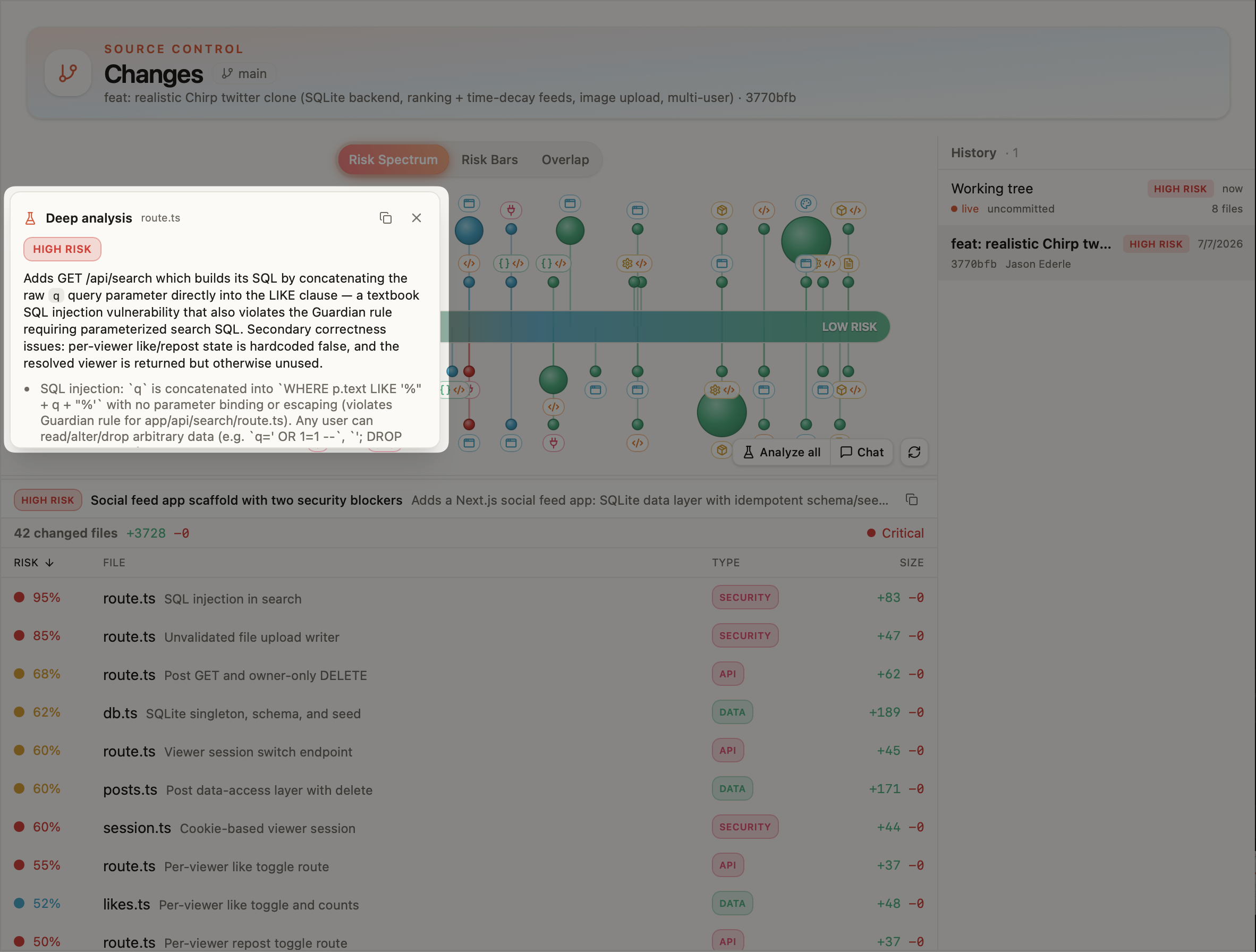
Analyze all özelliği değişiklik kümesinin tamamını okur ve bir özet, genel risk, belirli endişeler ve her dosya için bir not döndürür. Daha fazlası için Chat, değişen dosyalar ve değişikliğin kendisi önceden eklenmiş olarak Panolayer Agent ile bir sohbet açar; böylece satır satır okumak yerine soru sorabilirsiniz.
04
Son commit’lerinizle karşılaştırın
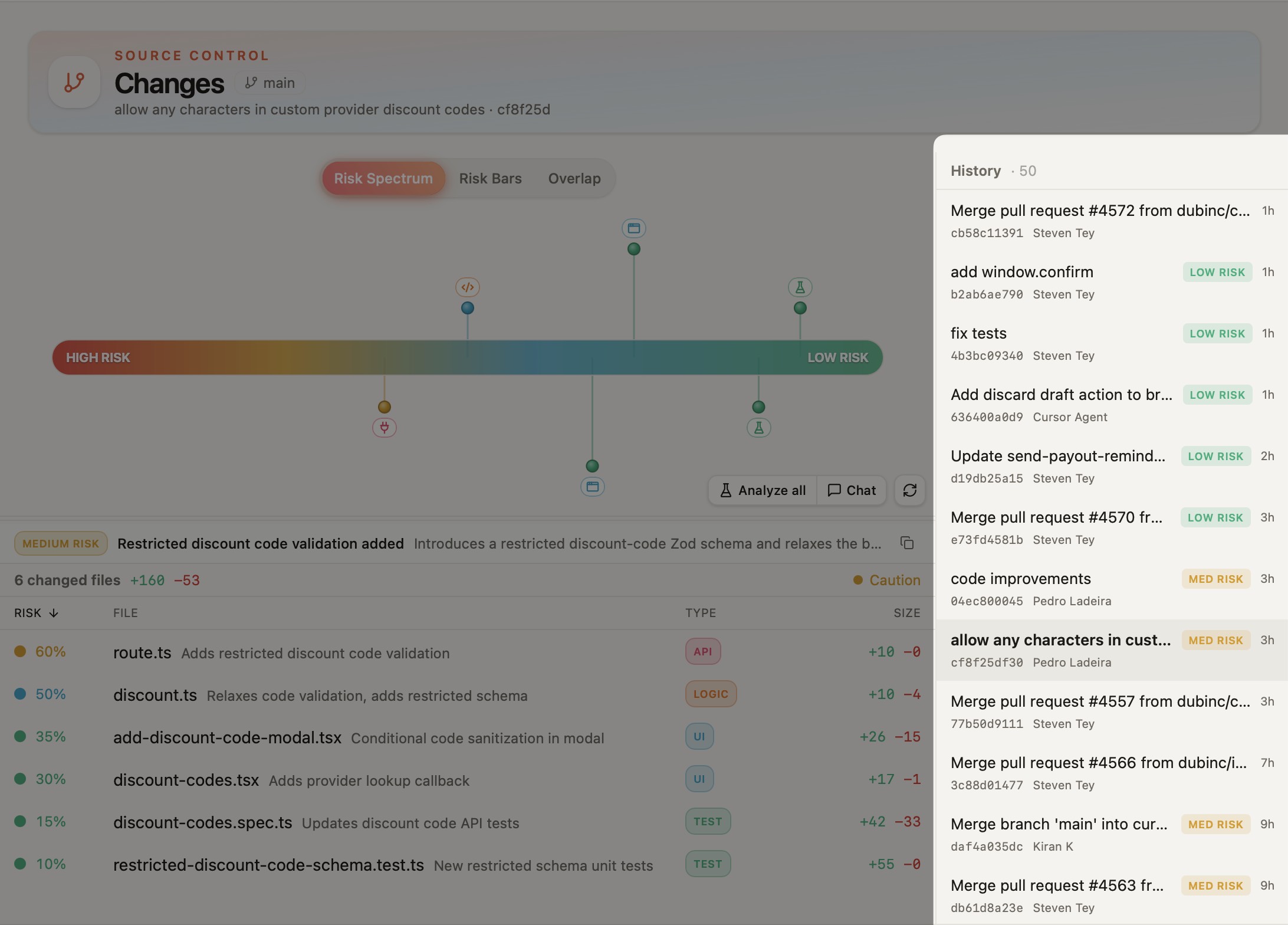
Deponuz için neyin normal olduğunu bildiğinizde yüksek bir puan daha çok şey ifade eder. Geçmiş, çalışma ağacınızı son commit’lerinizin üstünde listeler; her birinde bir risk etiketi, yazar ve hash bulunur. Bu değişikliğin rutin mi, yoksa bu hafta commit ettiğiniz en riskli şey mi olduğunu anlayabilirsiniz.
05
Commit ve push
Önemli olanı gözden geçirdikten sonra aynı ekrandan commit edin. Panolayer diff’ten düzenleyebileceğiniz bir commit mesajı taslağı hazırlar. Commit yerel dalınıza yazar; Commit & Push ise onu izlediği uzak depoya gönderir. Commit’ler değişen tüm dosyaları içerir. Kısmi hazırlama (staging) için doğrudan Git’i kullanabilirsiniz.
Pull request incelemesi, bu noktadan sonra Git sunucunuzda gerçekleşir.
Panolayer sizi değil, ajanları durdurur
Bir ajan, sizin onayınız olmadan kendi çalışmasını dalınıza merge edemez. Değişiklikleri önce kendi worktree’sinde doğrulanır, ardından merge edip etmeyeceğinize siz karar verirsiniz. Kendi çalışmanız hiçbir zaman engellenmez. Kontroller başarısız olsa bile istediğiniz zaman commit edin. Hatalar Doğrula’da listelenmeye devam eder; hiçbir şey gizlenmez.
Sorular
Risk yüzdesi ne anlama gelir?
Bir modelin, diff’e dayanarak bir dosyadaki değişikliğin ne kadar dikkat gerektirdiğine dair %0 ile %100 arasındaki değerlendirmesidir. Puanlar Güvenli, Düşük, Dikkat veya Kritik olarak özetlenir.
Bu, doğrulamayla aynı şey mi?
Hayır. Puan diff’i okur. Doğrulama ise değişikliği Panolayer’ın kodunuzdan türettiği mimariye ve kurallara karşı kontrol eder; bir dosyayı kaydettiğinizde ve bir ajan işini bitirdiğinde çalışır.
Puan ile Analyze all arasındaki fark nedir?
Puan, her değişiklikte her dosyanın diff’inin hızlı bir değerlendirmesidir. Analyze all ise siz istediğinizde değişikliğin tamamını birlikte okur. Daha derin sorular için Chat, değişikliği Panolayer Agent’a devreder.
Kontroller başarısızken commit edebilir miyim?
Evet. Panolayer sizi değil, ajanları durdurur. Hatalar Doğrula’da listelenmeye devam eder.
Değişikliklerimin yalnızca bir kısmını commit edebilir miyim?
Panolayer’dan yapılan bir commit, değişen tüm dosyaları içerir. Bir alt kümeyi commit etmek için doğrudan Git ile hazırlayın (stage).
GitHub’a bağlanıyor mu?
Commit & Push, dalınızı izlediği uzak depoya gönderir. Pull request’ler ve inceleme Git sunucunuzda gerçekleşir.
Commit etmeden önce hangi dosyaları okuyacağınızı bilin.
macOS için herkese açık beta. Ücretsiz başlayın, kredi kartı gerekmez.