
Construire
Construisez avec les agents que vous utilisez déjà.
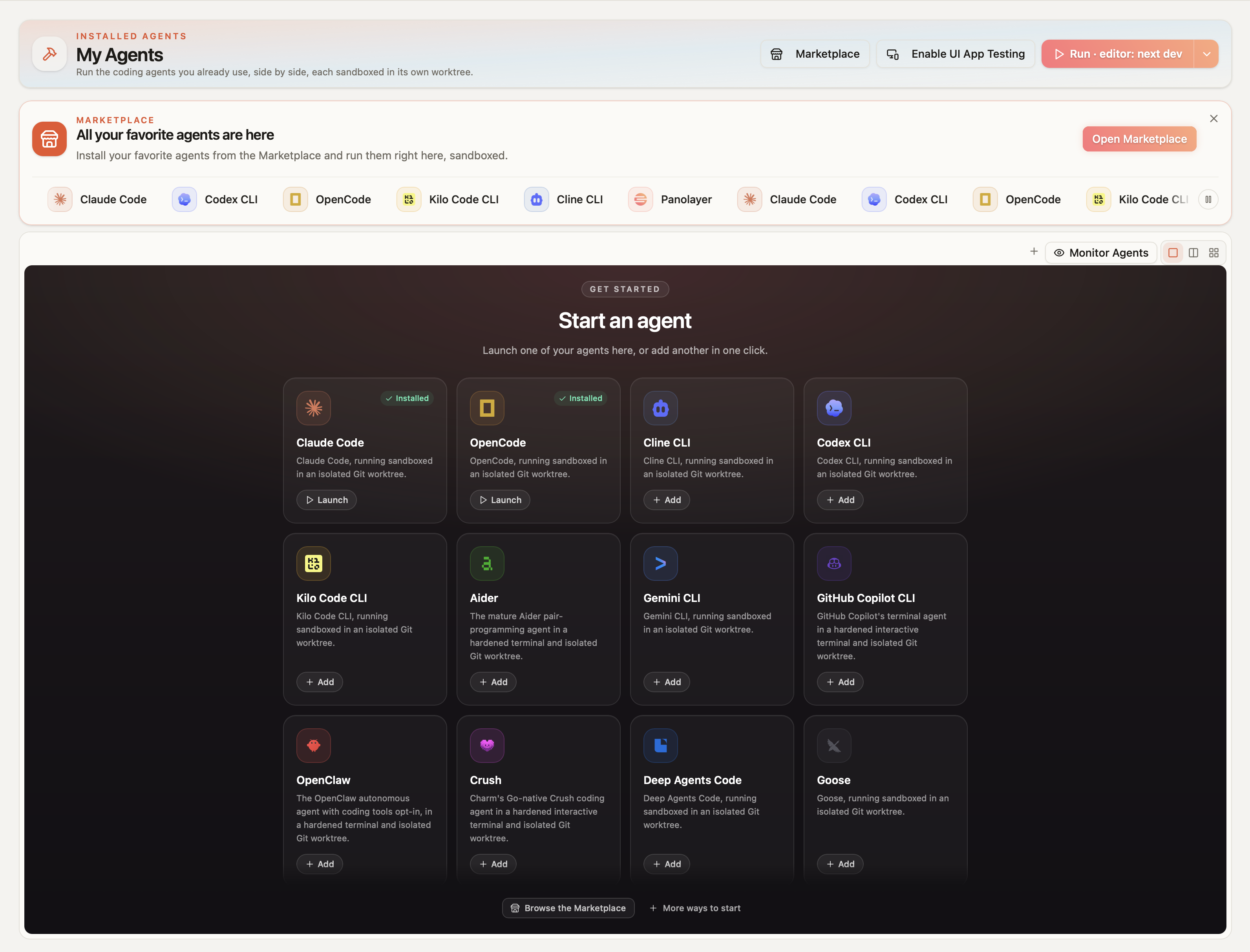
Utilisez les agents que vous connaissez déjà, ou construisez votre propre boucle pour votre projet, et exécutez-les côte à côte. Chaque agent voit la même carte de votre architecture, extraite de votre code, et fait ses commits dans son propre worktree Git. Quand un agent termine, Panolayer vérifie son travail pour détecter les régressions, et rien n’est fusionné dans votre branche sans votre approbation.
Bêta publique pour macOS. Gratuit pour commencer, sans carte bancaire.
- Panolayer Agent
- Aider
- Claude Code
- Cline CLI
- Codex CLI
- Crush
- Deep Agents Code
- Gemini CLI
- GitHub Copilot CLI
- Goose
- Kilo Code CLI
- Kimi Code
- Letta Code
- mini-SWE-agent
- Mistral Vibe
- Open Interpreter
- OpenClaw
- OpenCode
- Pi Coding Agent
- Plandex
- Qwen Code
Le bug ne se trouve pas dans les fichiers modifiés par l’agent, mais dans ceux qui en dépendent.
Imaginons que vous demandiez à un agent de faire renvoyer à getPrice() des dollars plutôt que des centimes. Il met à jour la page produit et le panier, et les tests passent. Mais le paiement appelle aussi getPrice(), traite toujours le résultat comme des centimes, et une commande de 20 $ est facturée 20 centimes.
01 / Construire
Tous vos agents au même endroit
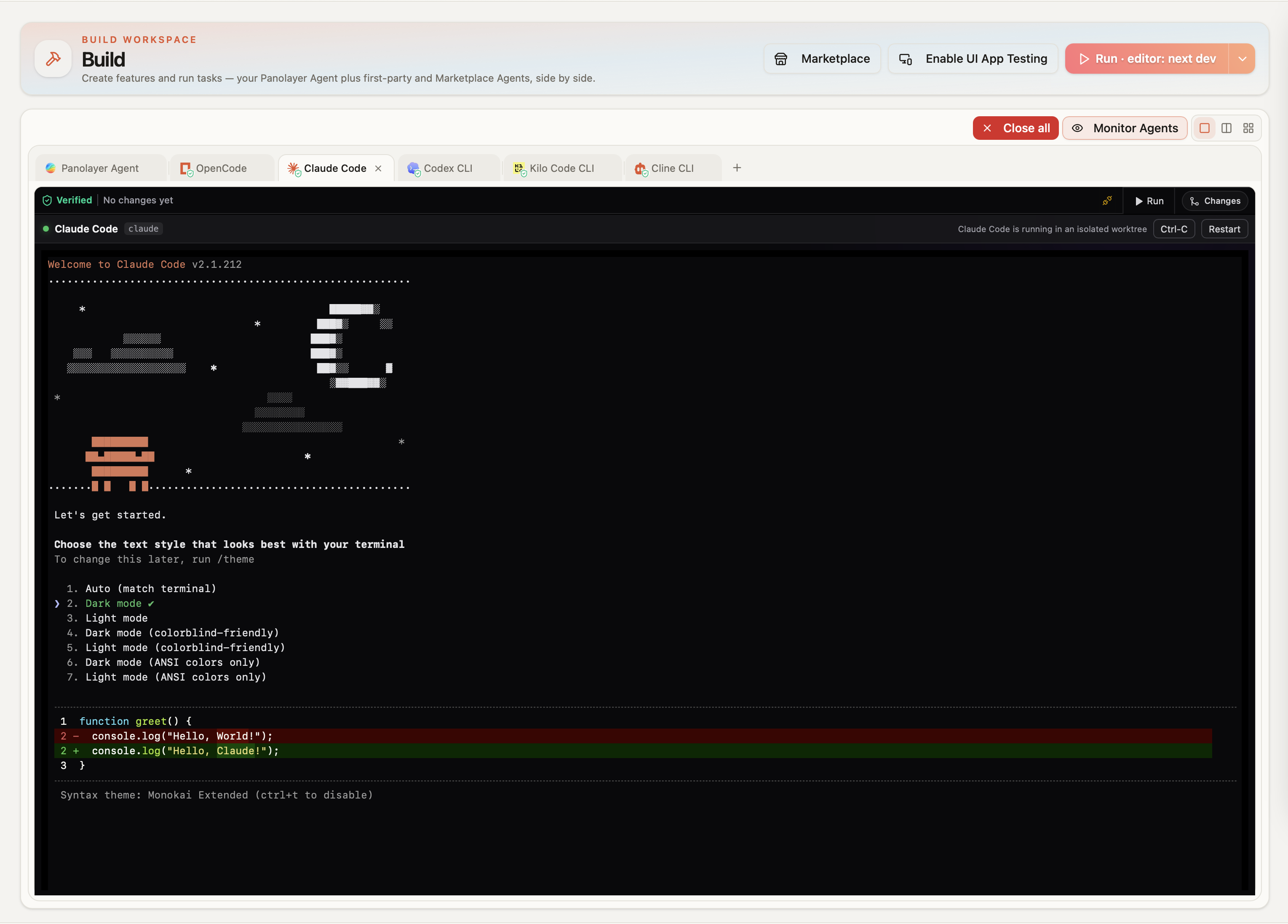
La plupart des développeurs utilisent aujourd’hui plusieurs agents, chacun dans son propre terminal avec sa propre idée de votre base de code. Dans Panolayer, ils travaillent côte à côte et voient tous la même carte de votre architecture, extraite de votre code : ils partent tous de la même vue de la façon dont le système s’articule.
Chaque agent fait ses commits dans son propre worktree Git, pour qu’ils ne s’écrasent pas mutuellement, et vous voyez chaque exécution, son statut et son résultat de vérification dans une seule vue.
02 / Construire
Installation en un clic, avec vos propres clés API
Vingt agents de codage sont disponibles dans l’Agent Marketplace, dont Aider, Claude Code, Cline CLI, Codex CLI, Gemini CLI et GitHub Copilot CLI, ainsi que Panolayer Agent. Installez celui que vous utilisez en un clic et lancez-le sur votre projet depuis la même page, sans rien configurer dans le terminal.
Les agents fonctionnent avec votre propre abonnement ou clé API. Vous payez directement votre fournisseur de modèles, et Panolayer ne s’interpose pas dans cette facture.
Agent Marketplace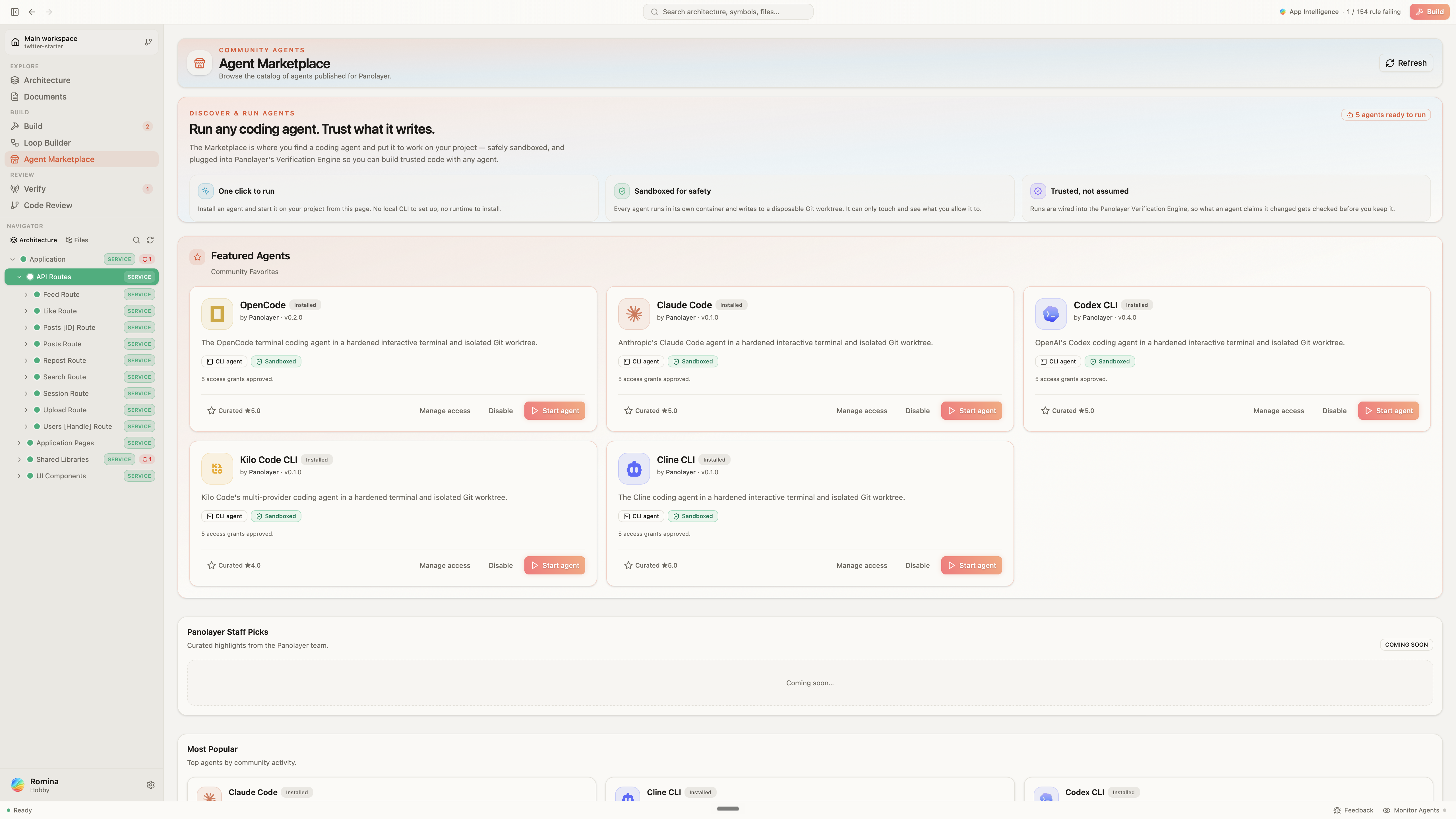
03 / Construire
Rien n’arrive sans vous
Un agent ne peut pas fusionner son propre travail dans votre branche. Quand il a terminé, Panolayer vérifie le résultat, puis c’est vous qui décidez. Les agents de la Marketplace s’exécutent dans un conteneur durci avec un périmètre d’espace de travail, des outils, un réseau, des limites de ressources et un accès aux secrets contrôlés. Votre arbre principal n’y est pas monté : l’agent n’a donc aucun accès à votre branche. Les agents CLI déjà installés sur votre Mac démarrent dans leur worktree, avec pour instruction de demander une fusion au lieu de l’effectuer.
Le point de contrôle se situe avant votre branche locale
Votre branche locale
feature/loginVotre point de départ. Vous pouvez aussi travailler sur main.
Des worktrees d’agents séparés
 Claude CodeCopie de travail propre · modifications propres
 Codex CLICopie de travail propre · modifications propres
Les agents font leurs commits ici aussi souvent que nécessaire.
Panolayer vérifie le travail
Quand l’agent déclare avoir terminé, la vérification s’exécute.
↶ Vérifications échouées → retour à l’agent
Votre branche locale
feature/loginLes modifications approuvées rejoignent votre travail ici.
- Vous faites le push
- Branche de fonctionnalité distante
- Pull request et revue
- Fusion dans main
Votre arbre de travail principal n’est pas monté dans le conteneur. L’agent ne peut pas y fusionner directement.
Ils s’exécutent sur votre Mac dans un worktree. Ils ont pour instruction de demander une fusion ; il s’agit d’une règle, pas d’une isolation par conteneur.
Vous pouvez toujours faire un commit et fusionner vous-même le travail des agents, même lorsque des vérifications échouent.
04 / Construire
Chaque exécution est vérifiée
Le résumé qu’un agent fait de son travail ne correspond pas toujours à ce qu’il a fait. Quand un agent termine, Panolayer enregistre chaque fichier qu’il a réellement modifié, pas seulement ceux qu’il a mentionnés, et vérifie l’ensemble de la modification par rapport aux règles portant sur ce code et sur tout ce qui en dépend.
Comment fonctionne la vérification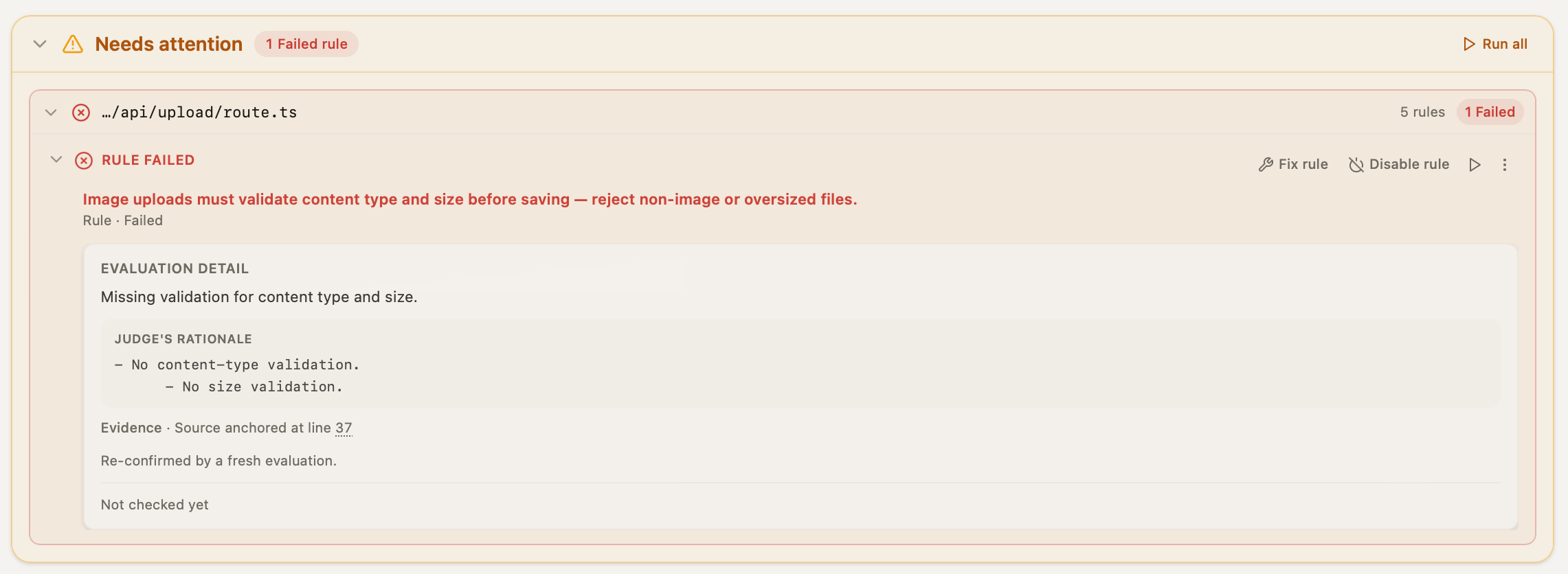
05 / Construire
Construisez votre propre agent
Le comportement d’un agent dépend de son harnais : sa façon de planifier, ce qu’il vérifie avant de déclarer avoir terminé, et ce qu’il fait quand une étape échoue. En général, vous ne pouvez personnaliser que le prompt. Le Graph Builder vous permet de concevoir le harnais lui-même en le disposant sous forme de graphe. Une fois terminé, vous pouvez le garder privé ou le publier dans la Marketplace.
Comment fonctionne le Graph Builder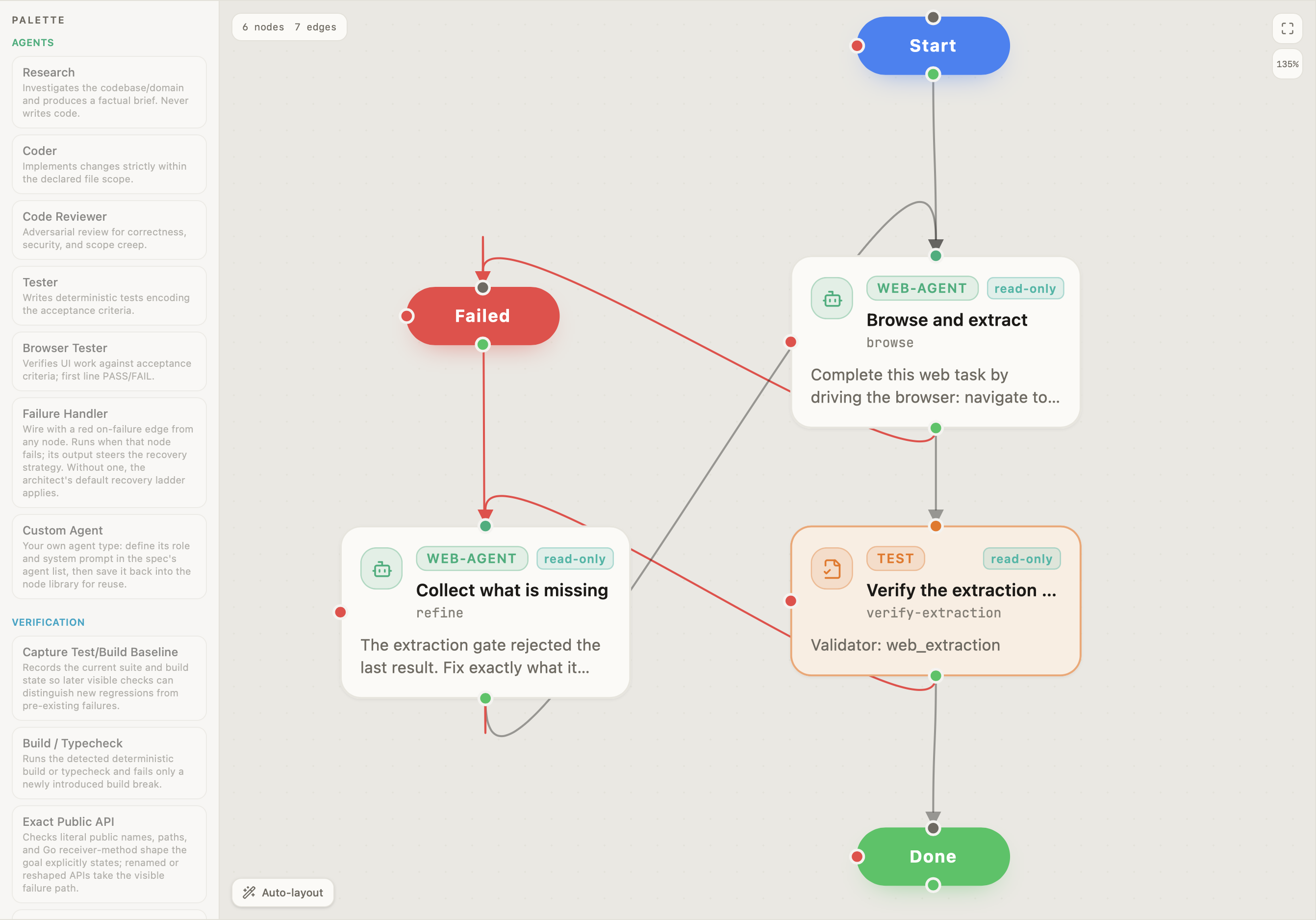
Panolayer Agent
L’agent de Panolayer, intégré à la plateforme et relié à la carte d’architecture et à la vérification. Utilisez-le pour coder, comme n’importe quel autre agent.
Quand la vérification signale une régression, Panolayer Agent prend comme consigne l’échec et les appelants concernés, le corrige dans son propre worktree, et le correctif repasse par la vérification.
C’est aussi lui qui exécute les boucles que vous construisez. Une boucle est le workflow que vous disposez dans le Graph Builder : les étapes, les vérifications entre elles et ce qui se passe quand l’une échoue. Panolayer Agent la parcourt étape par étape, exécute chaque vérification que vous avez ajoutée et suit le chemin d’échec que vous avez défini quand quelque chose tourne mal.
Et quand vous examinez des modifications avant un commit, vous pouvez ouvrir un chat avec lui, le diff déjà chargé, et lui demander ce qui a changé et pourquoi au lieu de lire chaque ligne.
Questions
Quels agents sont pris en charge ?
Panolayer Agent et vingt agents tiers sont pris en charge. La liste complète figure dans la référence des agents.
Voir tous les agents pris en chargeChaque agent s’exécute-t-il dans un conteneur ?
Non. Les agents installés depuis la Marketplace, oui. Les agents CLI déjà installés sur votre Mac s’exécutent sous votre identité, dans leur propre worktree. Cela sépare leur travail de votre branche, mais ce n’est pas un bac à sable de sécurité.
Un agent peut-il fusionner son propre travail ?
Non. Son travail est d’abord vérifié, puis c’est vous qui décidez. Vous pouvez le fusionner vous-même même si des vérifications échouent. Les échecs restent listés dans Vérifier.
Les agents voient-ils mon architecture ?
Ils le peuvent. Panolayer fournit aux agents un outil MCP pour interroger sa carte de votre base de code : structure, appelants et dépendances. C’est à l’agent de décider s’il l’utilise pour une tâche donnée.
Puis-je exécuter plusieurs agents à la fois ?
Oui. Chacun dispose de son propre worktree, et vous voyez toutes les exécutions côte à côte.
Ai-je besoin de mon propre abonnement ou de ma propre clé API ?
Oui. Les agents fonctionnent avec votre propre abonnement ou clé API. Panolayer ne revend pas d’accès aux modèles.
Est-ce que cela remplace mon éditeur ?
Non. Panolayer fonctionne à côté. Les agents travaillent dans leurs propres worktrees : vous pouvez continuer à travailler dans votre éditeur pendant qu’ils s’exécutent.
Essayez Panolayer sur votre base de code.
Bêta publique pour macOS. Gratuit pour commencer, sans carte bancaire.